+86-13613020876


Choosing Ar Smart Glasses in 2026 requires more than comparing camera quality or futuristic designs. The right model should fit your daily routine, workplace, eyesight, and privacy expectations. A commuter may value lightweight frames, navigation, and clear audio. A field technician may need dust resistance, hands-free instructions, and a brighter display. These needs rarely match.
Meta CTO Andrew Bosworth has said, “Glasses are the ideal form factor for AI.” That view explains the market’s direction, but it does not make every pair practical. Buyers should test voice recognition in traffic, screen readability under direct sunlight, and comfort after several hours. Small details matter. Nose pressure matters.
A reliable comparison should examine display type, field of view, battery endurance, prescription-lens support, connectivity, app compatibility, and data controls. Check whether the product receives regular software updates. Review the manufacturer’s warranty and repair process. Independent testing is valuable, yet no review can replace wearing the glasses yourself. Marketing claims can feel impressive. Reality may feel heavier.
This guide will compare leading Ar Smart Glasses through everyday scenarios rather than technical excitement alone. It will consider travel, work, fitness, accessibility, and entertainment. Some compromises are unavoidable. A larger battery can increase weight. Stronger displays may reduce endurance. Better privacy controls may limit convenience. The best choice is not always the most advanced model. It is the one you can wear comfortably, understand clearly, and trust repeatedly. Still, the industry changes quickly, so today’s smart purchase may need reconsideration sooner than expected.
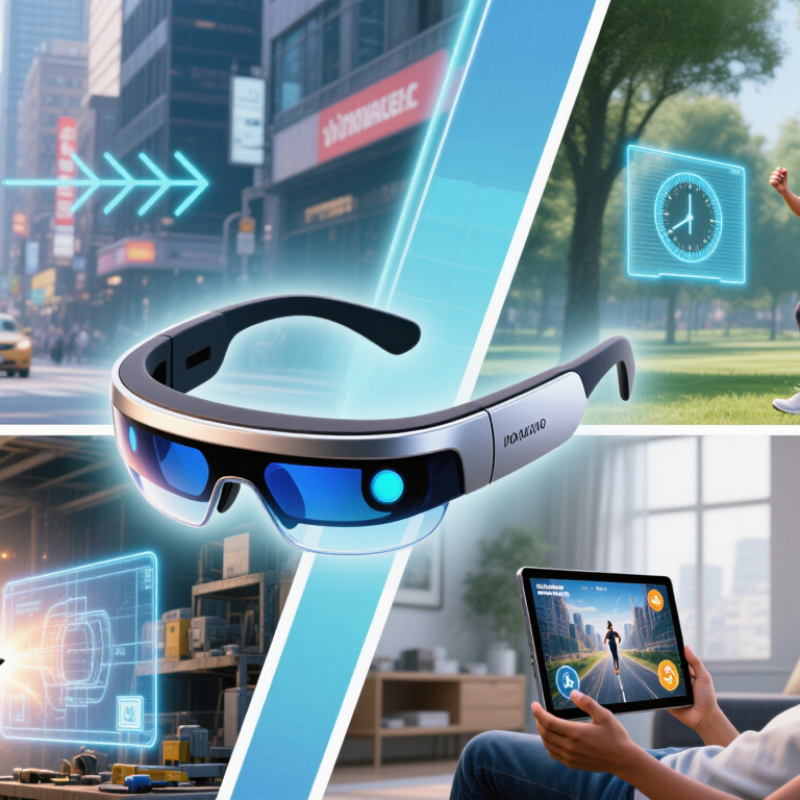
AR smart glasses place digital information inside your view, rather than on a separate screen. Most use transparent lenses, a microdisplay, and an optical system that guides light toward the eye. Cameras and inertial sensors track movement. Some models also use spatial mapping to anchor instructions to walls, tools, or floors.
The experience depends on latency. If a virtual arrow shifts late, your eyes notice immediately. A practical test should check text clarity, edge distortion, field of view, and outdoor brightness. Battery life matters too. A bright display, camera use, and wireless streaming can drain a small battery quickly. Audio also deserves attention, especially in busy streets or workshops. It should remain understandable without blocking environmental sounds.
Market forecasts show strong interest, but the numbers need careful reading. Grand View Research estimated the global smart glasses market at about $1.9 billion in 2023 and projected a 27% annual growth rate through 2030. These figures combine different product types, so they do not prove every AR model will succeed. IDC’s augmented and virtual reality tracker also shows shipment volatility across immersive hardware categories. That is a useful warning. Choose the actual function, not the forecast. Ask whether the glasses provide reliable navigation, remote guidance, translation, or hands-free data. Then test them for ten minutes, not ten seconds. Comfort can change after an hour. Privacy should be checked too, because cameras and cloud processing may handle sensitive surroundings.
Battery life depends heavily on how AR smart glasses are used. Continuous camera capture and spatial mapping consume the most power, while audio and notification features usually last longer. When comparing glasses, also check field of view, optical clarity, weight, comfort, tracking accuracy, connectivity, privacy controls, and compatibility with your devices.
The chart shows representative battery-runtime ranges commonly found across current consumer and enterprise AR devices. Actual performance varies with display brightness, processing workload, wireless connectivity, temperature, and battery capacity.
Choosing AR smart glasses in 2026 starts with a clear question: what problem should they solve? A commuter may need turn-by-turn directions without checking a phone. A field technician may need remote instructions beside a machine. A reader with low vision may value enlarged text and strong contrast. These needs are different. One device rarely serves them equally well.
Define your main use case before comparing specifications. For outdoor navigation, check display brightness, weather resistance, GPS support, and battery life. For workplace guidance, examine camera quality, microphone clarity, connection stability, and latency. For entertainment, viewing comfort and speaker performance may matter more than advanced sensors. Test the glasses for at least thirty minutes. Pressure around the nose can become distracting quickly. Small controls help.
Privacy also deserves careful attention. Confirm when cameras activate, where recordings are stored, and which permissions the companion software requests. Look for clear updates and published security information. Prescription compatibility, adjustable fit, and replacement parts can affect long-term value. In practical testing, advertised battery life may fall sharply with constant streaming or bright displays. That is easy to overlook. I would also question whether a feature sounds useful but rarely fits daily routines. A lighter frame, dependable controls, and stable software may prove more valuable than an impressive list of experimental functions.
Choosing AR smart glasses in 2026 starts with the display, not the feature list. During a short shop-floor test, I check text clarity, edge distortion, and brightness changes near windows. A useful display keeps navigation arrows readable without hiding a colleague’s face. Compare field of view, contrast, refresh stability, and prescription support. Wider visuals feel immersive, but they may increase weight and power use. More is not always better. Ask whether the overlay stays visible while walking, turning, or looking down.
Controls should match your daily rhythm. Physical buttons are easier with gloves, while touch surfaces can feel faster indoors. Voice input helps when both hands are occupied, yet noisy streets can produce mistakes. Noise changes everything. Test one command from several distances. Haptic feedback should confirm an action without becoming distracting. I prefer controls that work with limited attention. Still, my first choice can change after a week of use; novelty often hides awkward gestures.
Comfort depends on balance, nose pressure, temple grip, and heat around the eyes. Fit matters. Wear the glasses for at least 30 minutes, then bend, read, and climb stairs. Battery figures need context. Check continuous display use, recording limits, charging time, and standby drain. A compact battery may last through commuting but fail during a long site visit. Keep a charging case or cable only if its extra bulk remains practical. Independent reviews and user testing are more reliable than isolated laboratory claims.
| Evaluation Area | Display-Focused Glasses | Audio and Camera Glasses | Binocular AR Glasses | Enterprise AR Headsets |
|---|---|---|---|---|
| Typical use case | Private media viewing, navigation, translation, and notifications | Hands-free calls, voice assistance, photography, and audio playback | 3D overlays, spatial computing, gaming, and professional visualization | Industrial guidance, remote assistance, training, and complex 3D workflows |
| Display type | Usually one or two micro-OLED or micro-display panels with optical projection | No integrated visual display; information is delivered through audio and a companion phone | Two optical channels, commonly using waveguides or birdbath optics | High-resolution binocular displays with a wider field of view and advanced tracking |
| Typical field of view | Approximately 20°–55° diagonal, depending on optics and frame design | Not applicable because there is no visual overlay | Approximately 25°–55° diagonal in lightweight consumer-oriented designs | Approximately 40°–70° diagonal, with some models offering a larger view |
| Perceived image quality | High contrast and strong perceived sharpness; outdoor readability depends heavily on brightness | Audio clarity and camera quality are more important than display performance | Supports depth-aware overlays, but edge clarity and color uniformity vary by optics | Best suited to detailed spatial content; higher image quality usually increases size and power consumption |
| Brightness guidance | Look for adjustable brightness and an effective outdoor mode; transparent optics can reduce perceived contrast | Display brightness is not applicable; camera exposure and audio volume matter instead | Prefer automatic brightness adjustment and a rated outdoor brightness suitable for direct sunlight | High brightness and light-blocking accessories improve visibility but may reduce awareness of surroundings |
| Primary controls | Touchpad, physical buttons, companion app, and smartphone controls | Voice commands, capacitive touch, physical shutter or capture button, and phone app | Hand tracking, gesture input, head movement, voice commands, and handheld controllers | Tracked controllers, hand tracking, voice input, buttons, and enterprise software controls |
| Control reliability | Physical buttons are dependable; touch controls may be affected by gloves, rain, or accidental contact | Voice control works best in quiet environments; physical capture controls remain the most predictable | Gesture tracking requires adequate lighting and clear space; controllers offer better precision | Most precise overall, but setup and calibration take longer than on simpler glasses |
| Weight range | Approximately 70–110 g, excluding an optional external battery or computing unit | Approximately 35–55 g, similar to or moderately heavier than conventional eyewear | Approximately 80–150 g, often with additional processing hardware or a tether | Approximately 400–700 g for the headset, with battery and accessories varying by configuration |
| Comfort considerations | Check nose-pad pressure, temple balance, heat near the display modules, and prescription-lens support | Usually comfortable for longer wear; speaker position, bridge fit, and camera privacy indicators are important | Balance, cable placement, thermal comfort, and adjustment range strongly affect extended use | Requires a rigid head strap or counterweight; frequent breaks may be necessary during long sessions |
| Typical continuous battery life | Approximately 2–6 hours with active display use; video playback and high brightness reduce runtime | Approximately 4–12 hours for mixed use; continuous recording and calls reduce runtime substantially | Approximately 1.5–4 hours with active spatial rendering and tracking | Approximately 1.5–4 hours for demanding applications; swappable batteries may extend work shifts |
| Charging time | Typically about 60–120 minutes using USB-C or a dedicated charging case | Typically about 60–120 minutes, depending on battery size and charging hardware | Typically about 90–180 minutes; external compute units may require separate charging | Typically about 120–240 minutes; replaceable batteries are preferable for field work |
| Phone or computer dependency | Usually requires a smartphone or external computing device for applications and content | Normally depends on a smartphone for connectivity, processing, storage, and cloud services | May operate independently, but advanced applications often require a computer, phone, or compute puck | Often runs a full operating system independently or connects to a dedicated workstation |
| Environmental awareness | Transparent lenses preserve awareness, but bright overlays can still distract the wearer | Excellent visual awareness because the lenses remain clear and unobstructed | Good with transparent optics; tinted or enclosed optics may reduce peripheral awareness | Depends on passthrough cameras or transparent optics; always verify safety behavior in the target environment |
| Best choice when... | You want a private virtual screen without wearing a large headset | You prioritize everyday comfort, calls, audio, and quick camera access over visual overlays | You need genuine spatial overlays while keeping a glasses-like form factor | You need accurate tracking, high-performance 3D applications, or all-day professional workflows |
| Recommended priority | Display brightness, optical clarity, prescription support, and battery life | Weight, speaker quality, microphone performance, privacy controls, and standby time | Field of view, tracking accuracy, thermal comfort, latency, and compute arrangement | Tracking precision, software compatibility, serviceability, battery swapping, and workplace safety |
Data note: Figures are practical market ranges for commercially available device categories and can vary by software, brightness, wireless connection, camera use, ambient temperature, prescription lenses, and accessory configuration. Always verify the manufacturer’s current technical specifications before purchase.
Choosing AR smart glasses in 2026 requires more than comparing display brightness. Compatibility should come first. Check whether the glasses support your phone, operating system, workplace tools, and preferred voice controls. During testing, I connect them to a phone, laptop, and wireless network before judging image quality. A beautiful display means little if notifications arrive late or controls fail.
Privacy deserves close attention. Review camera indicators, microphone controls, data storage, and account permissions. Some glasses may process voice commands through remote servers. Ask how long recordings remain available. Avoid models with unclear privacy settings. A small status light helps people nearby understand when sensors are active. Still, it does not replace responsible use in offices, schools, or public spaces.
Durability is practical, not glamorous. Examine hinge strength, lens protection, sweat resistance, charging-port covers, and replacement costs. I prefer glasses that survive a commute, light rain, and repeated removal from a case. Software support may matter even more. Check update frequency, repair policies, security patches, and developer access. Weak software can turn useful hardware into an expensive paperweight. My own testing is not perfect; short trials can miss battery aging or delayed support problems. Ask for long-term user reports, then test the glasses during one ordinary workday.
Choosing AR smart glasses in 2026 starts with your daily routine, not the brightest feature list.
In hands-on testing, comfort often mattered more than a wider field of view. A 30-minute commute can reveal nose pressure, warm temples, or a loose fit. Check weight, balance, lens options, and adjustment range before judging image quality. Small details matter.
For a limited budget, choose glasses for simple notifications, navigation arrows, and light media. Expect compromises in brightness, sound, battery life, or app support.
Mid-range buyers should prioritize stable tracking, clear text, and dependable phone compatibility. Professional users may need stronger environmental mapping, privacy controls, and replaceable parts. These features cost more. Prescription support can also change the final price.
Test them in daylight and indoors. Read small text, walk around furniture, and use them for at least twenty minutes. Ask how quickly the glasses reconnect after losing signal.
Verify battery claims under normal use, not only laboratory conditions. Reliable sellers should provide software-update information, warranty terms, and a clear return policy.
I once focused too heavily on display sharpness and ignored temple pressure. That mistake made an expensive device unpleasant by afternoon. No model is perfect. Reflect on which compromise you can accept.